3 Rules of Staying Safe on a Computer
This is distilling my 30+ years of experience and knowledge down into some simple rules
to live by in the digital realm.
Rule 1: Keep all software patched and up to date
Especially software that touches the internet.
Why? This keeps things from automatically installing without asking you first.
Your operating system updates
- Windows Update
- Mac Software Update
Web Browser
- Chromium based (Brave for Privacy or Google Chrome for primary Google Users) (preferred)
- Firefox (second choice)
- Safari or Microsoft Edge (last - only use for trusted sites)
Programs launched from the Web Browser/internet
- PDF Software
- Fast/simple - Sumatra
- Complex annotations -
PDF-XChange Editor, Foxit Reader, Sejda,
- Legacy Adobe as last resort. Beware of Adware/spyware installs
Only trust windows/popups telling you there's an update if it's coming from the systray on Windows.
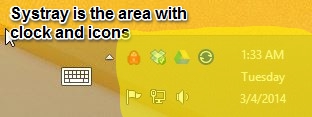
If you're browsing the web and something tells you to update xyz, DON'T trust it! Close all your
web browsers completely. If you're not sure if you need to update something, search to find the
latest version. If in doubt, ask.
Rule 2: Don’t click/download/install anything from the internet, especially if you didn’t go looking for it.
You are probably going to break this rule - if you KNOW what's safe that's good. If you don't know what's safe, read this section carefully, and ask if you don't understand.
Why? Viruses are going to come from the internet in many different ways (and those ways are always changing). This rule is about stopping you from opening xyz bad thing that was sent to xyz place.
***The most often mistake I hear from clients that
have contacted me about a virus/spyware infection was that they knew/recognized the person they got
infected from. You will receive viruses with people's names
you know/recognize in the From: field of an E-mail.
Never open an attachment in an E-mail
When you break this rule, you need to be able to identify a file extension.
Safe file types: .txt, pictures (.jpg, .gif, .tif, .tiff, .png etc.)
Possibly dangerous/safe file types: .doc(x), .xls(x), .pdf, .zip
Dangerous file types: .js, .jse, .exe, .vbs, .com, .scr and basically everything else not listed as above. If in doubt, it's dangerous.Full list here
If you're not sure about an attachment, upload it to VirusTotal to see what 60+ Antivirus software packages think about it.
Never click a web link (URL) in an E-mail
If you break this rule, you need to be able to: Understand there's a difference between what the URL looks like on the screen, and knowing where it actually takes you when you click it. Use the popup or bottom left corner of the window to see where it’s going to take you BEFORE you click. Here's a test: http://www.microsoft.com. If you think that link is going to take you to the Microsoft website you are wrong! Once you can tell it's not Microsoft go ahead and click it, read some more information about URLs.
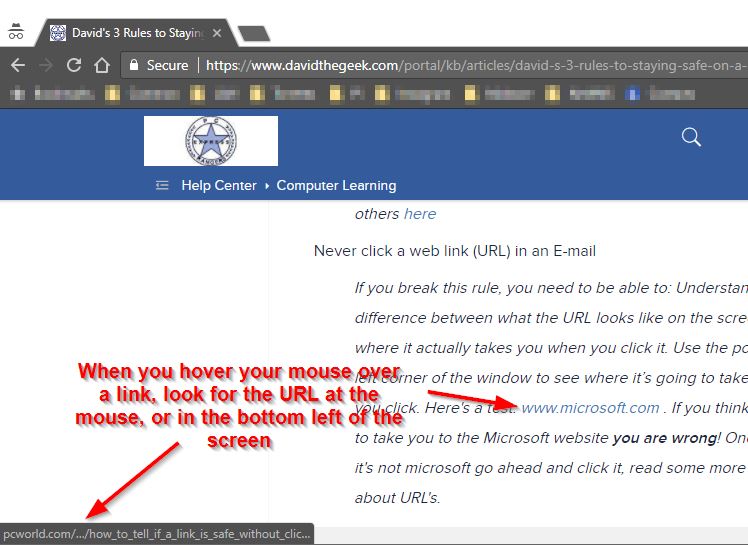
If you're on a mobile device you'll have to copy the URL BEFORE
you click on it and paste it into a note/text window to be able to see it. Clicking and following a
fake/phishing link will usually communicate that you don't know how to be safe, and will possibly
cause you to get more phishing/scam E-mails.
How to read a URL
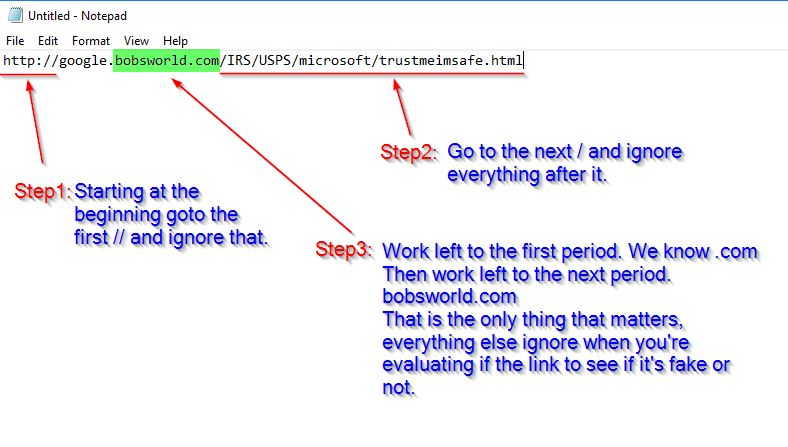
Before you open an attachment or click a link in an E-mail give it a sniff test: Evaluating
E-mail Messages: Scam or No Scam
Web Browser
Never open a program from your Web browser (Internet)
If you get a UAC Dialog asking Yes or No or prompting for your computer Username and password, stop! The program creating this prompt will have the ability to do anything it wants to your computer, write/delete files, send E-mails as you, collect your Windows Username and password etc.
Rule 3: Antivirus is your last line of defense
You shouldn't need it unless you have broken either Rule 1 or 2 (I don't use it
on my computers). However, if it's needed it will only catch between 95-98% of viruses. The 2-5% of
viruses that it misses is usually the latest virus and the one you're clicking on right now.
You need to: Know what Anti-virus software you already have installed on your computer.
You need to: Be able to identify if a program window is a window from a locally installed program, or a web browser window faked to look like a program window. Use the icon in the taskbar for the active window to tell what program it is.
Choice of Antivirus software
- Free, Simple, low overhead (doesn't slow your computer down much): Built into Windows 10/11 - Microsoft Defender
- Paid, Complex, more overhead slowing computer down more - Bitdefender. Call for pricing
And finally…if in doubt, call. :-)